









What Is 8hi Game?
8hi Game brings together online games such as Aviator, Rummy, Mines, Fortune Gems and Chicken Road 2 in one Android app. Its game selection includes slots, card and table games, crash games and fishing titles, giving players different formats to explore through a single account.
You can download the 8hi APK, install it on your Android phone and register with your mobile number. Existing players can sign in to the 8hi App using their registered account. Once signed in, you can browse the available games, check promotions and access your account controls.
This 8hi Game guide explains how to download and install the app, create an account, log in and set your password. Before choosing a game or claiming a bonus, check its rules and the conditions displayed in your account. Game availability and promotional offers can change.
8hi Game App Information
Name
8hi Game
Version
1.4.9
Downloads
100K+
Bonus
₹200–₹500
File Size
25 MB
Requirement
Android
Explore the 8hi App



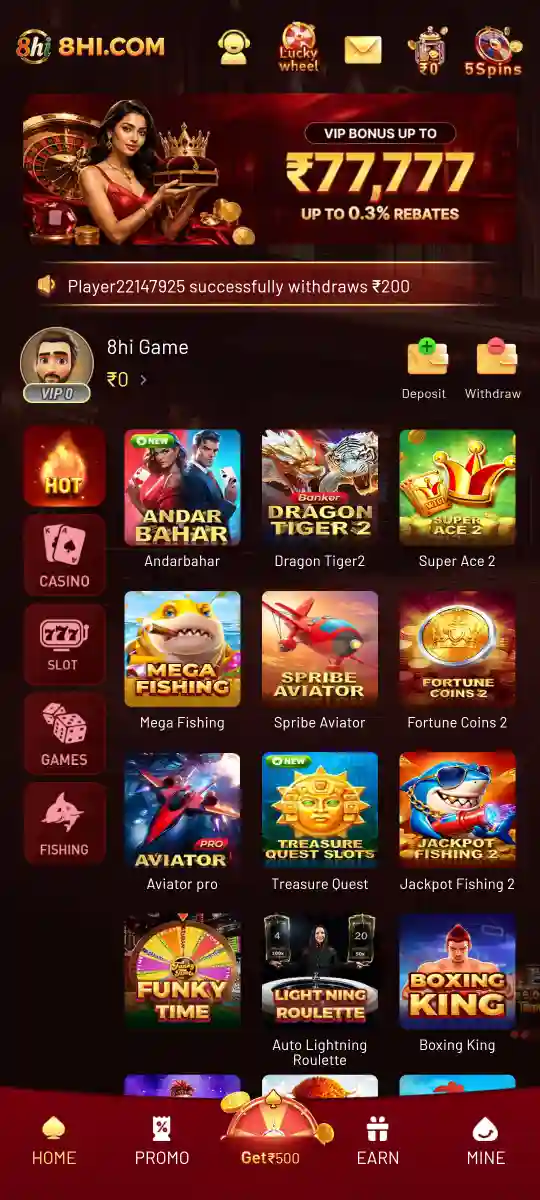
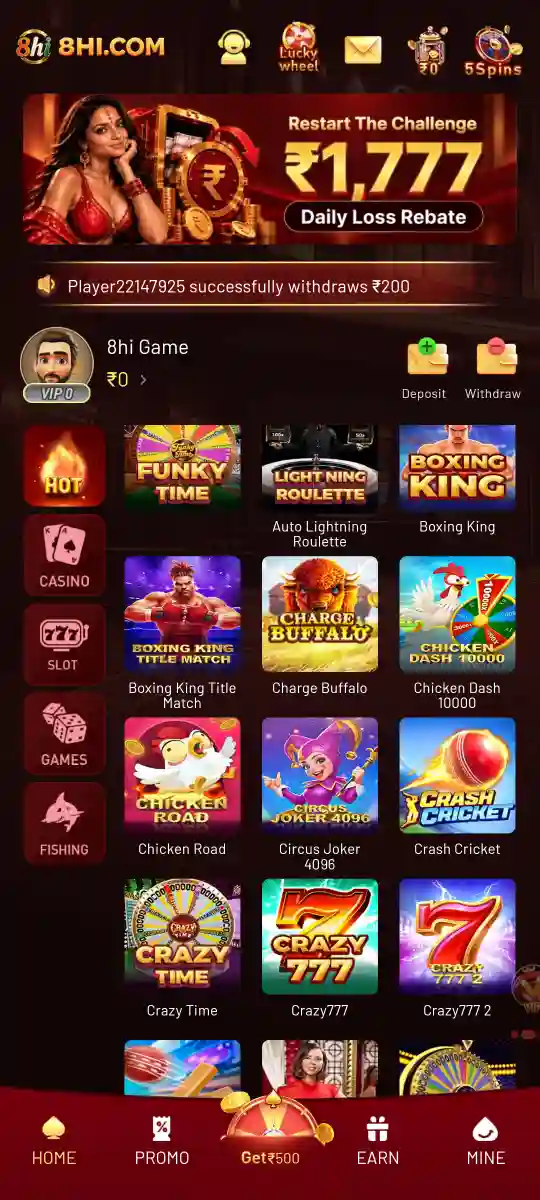


8hi Game Download for Android
The 8hi Game Download button opens the external 8hi access page. On that page, enter your mobile number and use Play now to continue through the download flow. Downloading the APK and installing it are separate steps: wait for the file to finish before opening the Android installer.
How to Download 8hi Game
- Tap the 8hi Game Download button at the top of this page.
- The linked 8hi access page opens.
- Enter your mobile number in the field provided.
- Tap Play now.
- Continue through the download prompt shown by 8hi and let the APK download begin.
- Wait until the APK file finishes downloading.
- Open the downloaded file from the browser or Downloads folder.
- Complete the Android installation process.
- Open the 8hi App.
If the download seems missing:
Check the browser's download list, Android notifications
and Downloads folder before tapping the button again.
A file still marked as downloading is not ready to install.
The 8hi Game Download guide covers download-specific problems in more detail.
Install the 8hi APK
The 8hi APK is the Android installation file; the 8hi App is what you open after installation. You need a completed download and enough free phone storage for the installer to finish.
Android may ask whether the browser or File Manager can install an app. Review the source before granting that permission. If the phone identifies the APK as harmful, stop instead of turning off its security protections.
Android Installation Steps
- Open Downloads or File Manager on the Android phone.
- Tap the downloaded 8hi APK file.
- If Android blocks installation, open the permission shown on screen.
- Allow installation for the browser or File Manager being used.
- Return to the 8hi APK.
- Tap Install.
- Wait until installation is completed.
- Tap Open.
If Android Shows “App Not Installed”
- Check that the downloaded APK is complete rather than a partial file.
- Free up storage if the phone does not have enough space.
- Review the install-source permission for the app opening the APK.
- If the file is damaged, delete that incomplete copy and obtain a fresh download.
- If an existing installation conflicts with the new file, read the error before removing the old app. Make sure you can still access your account first.
8hi Login – Access an Existing Account
8hi Login is for an account you have already created. Use the same registered mobile number. In the verification-code flow, tap Send Code and enter the newest code received on that number. If you have already set a login password, use the password option shown on your login screen.
Mobile Verification Login Steps
- Open the installed 8hi App.
- Enter the mobile number registered with your account.
- Tap Send Code.
- Wait for the verification code on that mobile number.
- Enter the newest verification code in the app.
- Complete verification.
- After successful verification, the 8hi account opens.
When the Verification Code Does Not Arrive
- Check the mobile number for a typing error.
- Confirm that the SIM for that number is active and receiving SMS.
- On a dual-SIM phone, check the SIM associated with the registered number.
- Wait for the resend timer instead of requesting several codes at once.
- Check blocked or spam messages; if multiple codes arrive, use the newest one.
Keep the code private:
Do not send your OTP to an agent or someone contacting
you through Telegram or WhatsApp. A verification code
can give access to your account.
For password access and other account-entry problems, see the 8hi Login guide.
Set Your 8hi Login Password
After mobile verification, the password setup is available through Profile → Account and Security. Create a password while you still have access to the registered SIM, because the setup uses a verification code sent to that number.
Password Setup Steps
- Open the 8hi App and go to Profile.
- Open Account and Security.
- Select the login password option.
- Confirm the registered mobile number.
- Tap Send Code.
- Enter the verification code received on the registered number.
- Create a new password using 8–32 characters.
- Enter the same password again in Confirm Password.
- Submit the form to save the login password.
Use a unique password, enter it identically in both fields and keep it private. After saving it, use your registered number and the password when choosing password-based login. Follow the requirements displayed on your screen if an app update changes the password rules.
8hi Register – Create Your First Account
Registration creates a new account; login opens an existing one. New users begin at the mobile-number access page and continue with Play now. Use your own number and complete the verification and account fields shown during setup.
Registration Steps
- Open the 8hi access page or installed app.
- Choose the registration option.
- Enter your own mobile number.
- Tap Play now on the access page.
- Tap Send Code when verification is requested.
- Enter the verification code received on the phone.
- Complete the fields shown in the registration form.
- Finish account setup.
- Keep the registered mobile number active for future login and account recovery.
If the number already belongs to an account, use login or the recovery option instead of repeating registration. The 8hi Register guide covers new-account setup separately.
Games in the 8hi Lobby
The side-menu categories and provider tiles help you find different types of games. Start with a category you understand, then open the selected title's rules. A slot, a crash game and a fishing game do not use the same controls or payout mechanics.
Aviator and Crash Games
Aviator, Spribe Aviator and Crash Cricket use
crash-style rounds. Check the selected title's
cash-out controls and what happens when a round
ends before you cash out.
Slot Games
Fortune Gems, Money Coming, Golden Bank 2 and
Super Ace are among the slot titles. Check the
stake per spin, paytable and bonus-feature rules
for the game you open.
Card and Table Games
Rummy, Andar Bahar, Dragon Tiger 2 and Lightning
Roulette use different rules. Review the choices
and stake displayed for each title rather than
carrying over rules from another game.
Fishing Games
The fishing selection includes Mega Fishing,
Cai Shen Fishing, Dragon Fishing II and Jackpot
Fishing. Understand the firing controls and
credit usage before beginning a session.
Mines and Chicken Road
Mines, Chicken Road and Chicken Road 2 appear
as separate titles. Read the risk settings,
multiplier information and cash-out conditions
available in the selected game's interface.
How to Navigate the 8hi App
- HOT: Browse the featured selection shown in the lobby.
- CASINO, SLOT, GAMES and FISHING: Move between the game collections in the side menu.
- JILI, Evolution and KoolBet: Browse the games grouped under those provider tiles.
- HOME: Return to the main lobby.
- PROMO: Open the available promotions and read each offer's conditions.
- EARN: Review the earning-related options and their current eligibility rules.
- MINE: Open the account area and available profile controls.
- Deposit and Withdraw: Find the separate transaction shortcuts beside the displayed balance.
- Lucky Wheel: Review the wheel's entry and reward conditions before participating.
If you cannot find a title listed here, check the relevant category inside your current app. Catalogue changes, rather than a download fault, can explain why a particular game is no longer in the same position.
8hi Bonus and Rewards
Use PROMO, EARN and the Lucky Wheel area to review the offers available in your account. The bonus range in the app-information box is not a promise that every user receives that amount or can withdraw it immediately.
Each promotion has its own eligibility, usage and withdrawal conditions. Read the offer displayed in your account before claiming it, including any qualifying action and expiry date.
Check These Details Before Claiming
- Who qualifies: new accounts, existing users or a specific account level.
- Whether a deposit, invitation or another action is required.
- How the credit is added and where it can be used.
- Any wagering, usage or withdrawal conditions.
- The claim deadline and the reward's expiry date.
A displayed reward, cash balance and withdrawable balance may mean different things. Read the actual offer in your account; a bonus does not guarantee a winning result.
8hi Deposit and Withdrawal
Deposit adds funds through the payment options offered to your account. Withdraw is the separate control for requesting a payout from eligible funds. Both shortcuts appear beside the balance, but their requirements should be checked individually.
For a deposit, confirm the payment method, amount and destination shown for that transaction. For a withdrawal, check the available balance, payout details and any verification requested on your screen. Check the minimum and maximum amounts, fees and processing information displayed in your account before submitting a transaction.
If a Transaction Is Pending
- Keep the transaction reference, amount, date and receipt.
- Check the transaction record inside your account.
- Contact the platform's account support with the relevant transaction details.
- Do not make repeated deposits to try to fix a payment that has not appeared.
- Keep passwords, OTPs, banking PINs and full credentials out of support messages.
Payment safety:
Do not pay an “unlock fee,” “release fee” or
“priority withdrawal fee” to someone contacting you
privately. 8hi.games cannot
access your account balance or process a deposit
or withdrawal.
8hi App and Login Problems
The App Does Not Open or Stays on Loading
- Close the app fully and reopen it.
- Check whether the phone's internet connection is working.
- Restart the phone and check free storage.
- Confirm that installation finished and that you are opening the intended 8hi app.
- If the problem continues, note the error message and when it appears before contacting account support.
Login Does Not Complete
- Use the mobile number associated with the existing account.
- For code login, use the newest SMS code and wait for the resend timer.
- For password login, check typing errors and accidental spaces.
- Use the account-recovery option shown on your screen if you cannot remember the password.
8hi Account and APK Safety
8hi.games publishes information about 8hi Game. The download button leads to an external game access page; accounts, games, balances and transactions are managed by that platform. A working link or a familiar logo alone does not verify an APK's safety.
- Check the destination address before entering account information.
- Avoid modified APKs, forwarded files and “unlimited bonus” downloads.
- Keep Android security protections enabled and review installation permissions.
- Never share login passwords, OTPs or banking PINs.
- Do not give remote access to your phone to an unknown contact.
- Avoid “predictor,” “hack” and guaranteed-win claims.
For website information and updates, use Join Telegram for Updates at the top of the page. Telegram updates do not replace the platform's account support for a missing payment or login recovery.
Responsible Play
18+ only. Real-money gaming can result in financial loss. Set a spending and time limit, take breaks and avoid borrowing money or increasing a deposit to chase losses. Gaming is not a guaranteed source of income. Check the service's eligibility and availability requirements before participating.
8hi Game FAQs
It is an Android gaming platform with a shared lobby
for slots, crash games, card and table games,
and fishing titles.
It opens the external game access page. Enter your
mobile number, tap Play now and continue through
its Android download flow.
The APK is the Android installation file.
The app is the installed software that opens
the lobby and account controls.
Register if you are creating your first account.
If an account already exists for your number,
use login or the account-recovery option.
The account flow described here lets you set a
password through Profile → Account and Security
after mobile verification. Use the password
option shown on your login screen.
Check the number, SIM signal and blocked messages.
Wait for the resend timer and use the newest
code when it arrives.
Review PROMO, EARN and the Lucky Wheel area.
Check eligibility, usage conditions and expiry;
the displayed bonus range is not a guaranteed reward.
The catalogue can change. Check the relevant
category and provider tiles in your current
app for the available selection.
No. Keep the transaction reference and use the
gaming platform’s account support. This information
website cannot access balances or release payouts.
The Telegram button is for website information
and updates. Do not send passwords, OTPs
or banking credentials to channel contacts.
No. Bonus conditions and game outcomes are separate.
A reward does not guarantee profit
or a withdrawable balance.