
8hi App for Android
8hi App brings games such as Aviator, Rummy, Mines, Fortune Gems and Chicken Road 2 to your Android phone. Through one registered account, you can browse different game collections, review promotions and access the profile and transaction controls available to you.
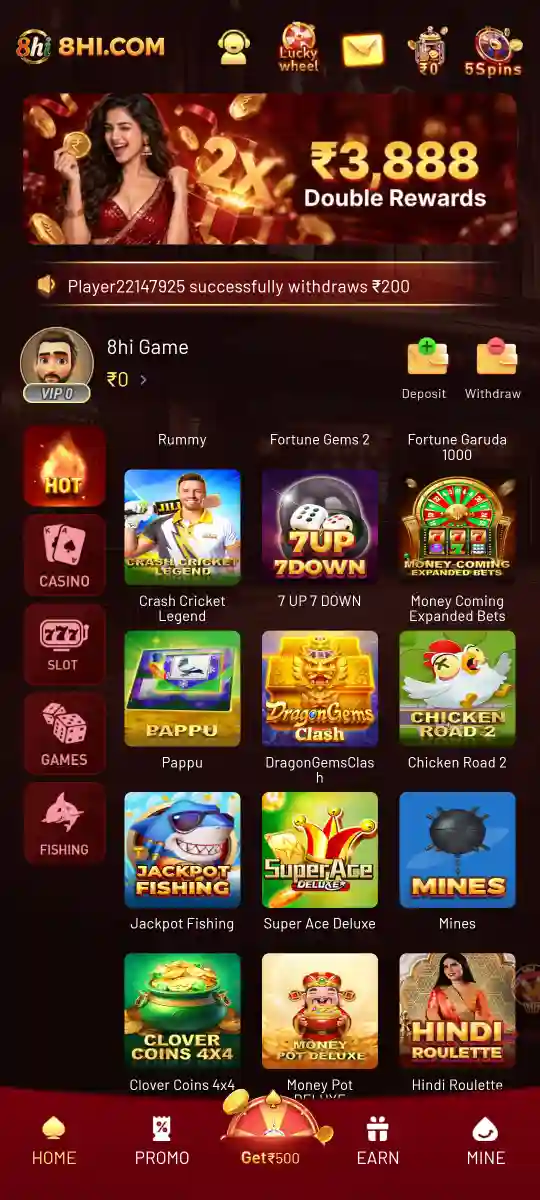
The app includes HOT, CASINO, SLOT, GAMES and FISHING sections, along with provider tiles such as JILI, Evolution and KoolBet. These offer different ways to find a title. Before opening a game, check its rules, stake controls and any conditions attached to a promotion.
This guide focuses on using the installed application: finding the right section, accessing your account, handling updates and resolving loading problems. For the complete introduction and download process, visit our 8hi Game homepage.
8hi App Information
The version and size above describe the package listed by this guide and may differ from the current release. Check the package details before installing. Download totals are not independently verified, and bonus availability depends on the offer shown to your account.
Explore the 8hi App


8hi App and APK: What Is the Difference?
The APK is the file Android uses to install the application. The app is the program you open once installation finishes. Downloading a file does not mean the application is already installed.
Find it in your browser's downloads or the phone's Downloads folder. Opening it starts the Android installer.
Open it from the home screen or app drawer to access games and your account.
If installation has not completed, use the 8hi APK guide. If the app is installed but cannot open, follow the app troubleshooting section on this page.
8hi App Navigation and Features
The bottom navigation separates the main game screen from promotions and account options. Use the labels below to choose the section you need instead of moving through unrelated menus.
Return to the game selection and browse the categories or provider tiles.
Review available offers. Read eligibility, expiry and usage conditions before claiming a reward.
Check the earning-related options shown to your account. Availability and conditions can differ between offers.
Open the account area and find the available profile and account controls.
Deposit and Withdraw are separate shortcuts beside the displayed balance. Check the amount, payment details and account requirements before submitting a transaction. The Lucky Wheel has its own participation and reward conditions.
Games Available in the 8hi App
Browse by game type or provider. JILI, Evolution and KoolBet are provider selections; SLOT and FISHING are game collections. A provider tile and a game category can lead to different views of the available catalogue.
Titles include Fortune Gems, Money Coming and Super Ace. Review the stake per spin and the game's paytable.
Aviator and Crash Cricket use crash-style rounds. Understand the selected title's cash-out controls before joining a round.
Rummy, Andar Bahar, Dragon Tiger 2 and Lightning Roulette have different rules and betting choices.
Mega Fishing, Cai Shen Fishing and Dragon Fishing II use fishing controls and credits. Check how credits are used in the game.
Mines, Chicken Road and Chicken Road 2 are separate titles. Check the risk settings and cash-out conditions inside the game you choose.
The catalogue can change. If a title is missing, check its category and provider selection in the current app; reinstalling will not necessarily restore a game that has been removed from the catalogue.
To browse other game platforms listed on this website, visit Popular Games. That directory is separate from the game catalogue inside the 8hi App.
8hi Account and Security Tools
Existing users should sign in with the mobile number registered to their account. If Send Code is offered, use it for verification-code access; choose password login if it is available and you have already created a password.
If your account offers password setup, look for Profile → Account and Security. Follow the verification requested on screen; labels and available options may vary. Keep that SIM accessible and do not share the code with anyone offering to manage your account.
- Use your existing account rather than registering again when login fails.
- Use the newest verification code if more than one message arrives.
- Keep your password unique and check for accidental spaces when signing in.
- Use the recovery or support option shown by the platform if you lose access.
For the numbered sign-in and password setup steps, use the 8hi Login guide.
First-Time Use After Installation
Open the installed app and complete account access before exploring games. New users can follow the registration guide; existing users need login.
- Open the app from the Android home screen or app drawer.
- Let the first screen load before tapping several controls.
- Choose new-account setup or existing-account login as appropriate.
- Enter your mobile number and complete the verification requested on screen.
- Check that the main game screen opens after account access completes.
- Review the account security options and set a password if needed.
- Choose a game category and read the selected title's rules before playing.
Updating the 8hi App
If the app presents an update, review the destination before downloading the new package. Check the installed version in Android's app information screen; the exact settings labels vary by phone.
- Confirm that the update is intended for the same application.
- Allow enough free storage for the package and installation files.
- Make sure you can access your registered number and account before changing the installation.
- Read an update error before uninstalling the existing app.
- Stop if Android flags the package as harmful; do not disable protection to force an update.
Do not assume an update will fix a pending transaction, expired offer or unavailable game. These can be account or platform issues rather than an app-version problem.
Android Performance and Loading
Separate an app-wide problem from a problem affecting one game. If the main screen works but a single title fails, record the title and error. If every section is slow, check the connection and the phone's available resources first.
Check whether other services load normally. Try a different stable network when only the current connection appears unreliable.
Leave room for app data and updates. The APK download size is not the app's total installed storage usage.
Close unnecessary heavy applications when the phone has limited available memory.
Note which sections work. This helps distinguish a device or connection problem from a title-specific issue.
Common 8hi App Problems and Fixes
The App Does Not Open
Close the app fully, restart the phone and check free storage. Confirm that installation completed. If the same error returns, keep its exact wording for platform support.
The App Opens but Keeps Loading
Check whether your connection works elsewhere and try another stable network. If the problem occurs on more than one network, it may need platform support rather than another installation.
The Login Screen Keeps Returning
Check the registered number and the login method you selected. Use the newest code for verification login or your saved password for password login. If verification succeeds but the app returns to login, record that behaviour and contact account support.
A Game Freezes or Closes
Note the game name, error and approximate time. Reopen the app and close unnecessary background apps. If funds or a round result are involved, keep the relevant account record and avoid repeating a transaction to test the problem.
Should I Clear App Data or Reinstall?
Try reopening, checking the network and restarting first. Clearing app data can remove the local session and settings; reinstalling can also require login again. Make sure you have account access before either action.
App Safety and Account Protection
8hi.games provides information about the app. The download button opens an external game access page. The gaming platform manages accounts, balances and transactions; this website cannot recover an account or release a payment.
- Check the destination before entering your mobile number or account details.
- Avoid modified APKs, predictor tools and guaranteed-win claims.
- Review requested permissions and keep Android security protections enabled.
- Keep OTPs, passwords and banking PINs private.
- Use the Telegram button for website updates, not as a substitute for account or payment support.
18+ only. Real-money gaming can lead to financial loss. Set spending and time limits, avoid borrowing or chasing losses, and check the service's eligibility and availability requirements.